Fixed the Flow and Got 97,674 installs: How You Should Really Run Your iGaming App [Case Study]
You’re running traffic to an iGaming app and…Tracking breaks, data disappears, in-app events don’t match reality, and the app glitches. Half the time, you’re not even sure which KPI you’re actually chasing.
Sounds familiar? Then this post is for you.
Here’s a real case where an iGaming brand finally got clear on flow, and as a result, drove 97,674 installs and 21,134 registrations in just 3 months.
Karlina Berzina, Senior Account Strategist: This partner has been with us for a long time, and our collaboration goes well beyond just sourcing traffic. We have formats that let us guide users across the entire funnel: from broad reach and initial brand discovery to repeat touch points and optimization toward deposits and retention. For iGaming, this matters more than anywhere else: sustainable growth simply isn’t possible without retaining users and increasing their LTV.
That’s why our focus has shifted to being a true performance partner, not just a traffic source – one that helps advertisers work with audience quality across the full user lifecycle. To support this, we also have dedicated specialists who focus specifically on growing partners in the iGaming segment.
Below is a simple playbook you can use in your own campaigns, whether you’re running offers or promoting your own iGaming app.
The Case Overview
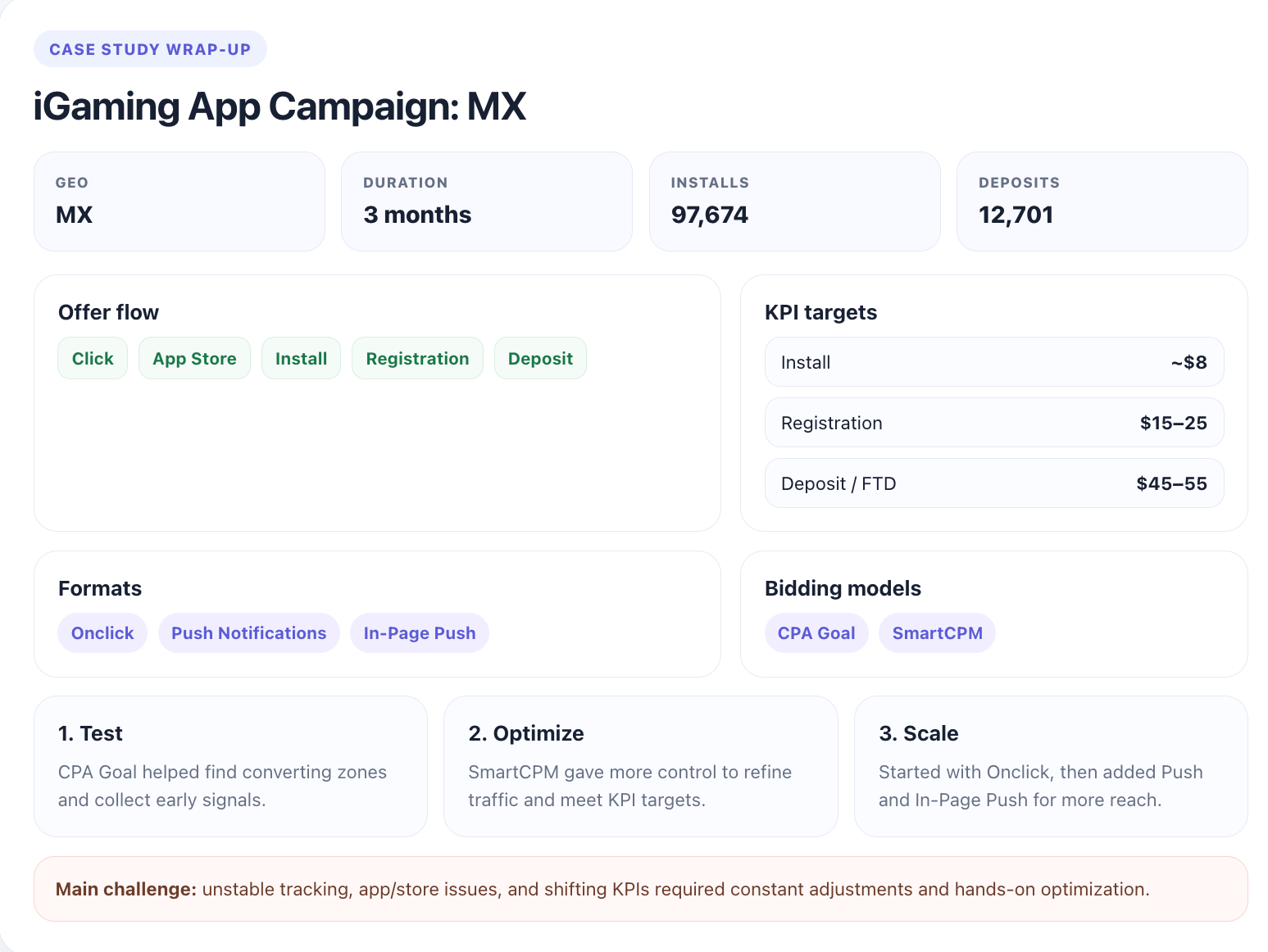
Main challenges: Tracking wasn’t always accurate; sometimes there was no data at all; the app and store had internal issues; and, on top of that, the KPIs kept changing during the campaign. Making the whole setup work required constant adjustment, and a lot of hands-on optimization – especially when things didn’t go as planned.
When the partner began, the campaign had the following KPIs (maximum the partner was willing to pay) for every funnel step:
- Install: ~$8
- Registration: $15–25
- Deposit (FTD): $45–55
So, the goal was clear: our partner needed to keep this stable funnel from install to deposit at the right cost.
Campaign Setup
Karlina: Rather than making changes too quickly, we allowed campaigns to stabilize, then continuously refined the setup by removing non-performing or less relevant traffic and focusing on segments that contributed to installs, registrations, and deposits.
Choosing a bidding model
There were two main options to choose from:
- CPA Goal – the quickest and easiest option to launch a campaign. It’s perfect for testing as it helps quickly find converting zones. However, it optimizes only for the first conversion signal (like an install), not for the full funnel (including registration and deposits).
- SmartCPM – a more flexible option where you fully control your bids and optimize traffic more precisely. However, it requires more time and involvement.
In the end, the partner decided not to rely on a single model. They used CPA Goal for testing and finding the best zones, then switched to SmartCPM to manually optimize and scale the results.
Karlina Berzina: This approach proved to be more effective: automation helped quickly gather data, while manual optimization allowed the team to refine results and meet the target KPIs. It became clear that it’s not the model itself that matters, but how you use it. Automation helps, but the best results come from combining both, knowing when to trust the algorithm and when to take control.
Choosing the format
The partner began with Onclick traffic and ran parallel tests using CPA Goal and SmartCPM to understand which model performs better under the KPIs. After the initial launch phase, they gradually expanded their setup and added Push and In-Page Push formats to boost reach.
Campaign Flow: Testing and Optimization
As the funnel had several steps with different KPIs, our partner followed a clear set of rules to stay in control.
The first two were basic enough: they gave campaigns at least 2 days to stabilize and show real costs, without any optimization. Then, they kept a close eye on performance across OS, devices, and browsers to spot early trends and understand what’s working.
Karlina: Rather than making changes too quickly, we allowed campaigns to stabilize, then continuously refined the setup by removing non-performing or less relevant traffic and focusing on segments that contributed to installs, registrations, and deposits.
And here are the rest of the rules:
- Eliminate non-converting zones gradually
Which means breaking down traffic into smaller segments: zones, user behavior, performance signals, and asking the important question: Does this actually contribute to the conversion goals?
If the answer is no, the partner excludes these parts of the traffic immediately. Step by step, they removed inefficiencies and reduced waste.
- Use clear rules to make decisions on blacklists and whitelists
Besides simply removing bad zones, some traffic segments needed to be whitelisted or blacklisted – but what exactly should you blacklist? For this part, our partner created another quick set of rules:
- Rule 1: No Signal. If a zone spends more than the cost of two of our most expensive conversions (Deposit goal) without generating a single install, registration, or deposit, it’s immediately blacklisted.
- Rule 2: Empty Promise. If a zone delivers a high volume of registrations at a cost equivalent to two deposits but fails to drive meaningful follow-up actions, it also gets blacklisted.
- Rule 3: Proven Performer. If a zone consistently delivers conversions at a strong, efficient cost, it earns a place on the whitelist.
Also, this case study highlighted a significant difference between whitelists and blacklists. Unlike blacklisting, which is fast and reactive, whitelisting takes time. To whitelist, you don’t just look for users who install or register, but those who actually complete the whole funnel and deposit in the end.
Karlina: The first meaningful whitelist evaluation should only happen after about one week. For this client, developing a fully optimized, high-performing whitelist took around two months. Sounds expensive? It can. But it’s also intentional. While you’re waiting for deeper signals to mature, you’re not standing still: you’re already applying your first optimization layer by cutting off low-quality traffic using the ‘No Signal’ rule. In practice, this means eliminating waste early while giving high-potential zones enough time to prove themselves.
- Respect the conversion window
This rule implies paying much attention to user behavior. It’s about such questions as
- How long does a user stay engaged?
- How many days after install or sign-up can we realistically expect them to convert?
The answers help define the initial testing window. In most cases, it aligns with a 30-day period. It doesn’t mean you simply wait for 30 days and do nothing, though – quite the opposite, in fact.
A user may take time to reach the final conversion step. So, while you optimize, you also respect the conversion window. What does it exactly mean in this very campaign?
This:
Step 1: Our partner gave the system at least 2 days to stabilize and reveal realistic costs. They don’t interfere during this period and simply let the algorithm learn. After the first 2 days, the real work began:
Step 2: They started analyzing the data and applied the first optimization filter, which is the No Signal Rule. Then, the rest of the optimization stepped in.
- Add formats gradually
As Karlina puts it, it’s far more effective to concentrate on one thing at the start, build it right, and then scale gradually with purpose.
This is why she suggested our partner begin with Onclick. Once the campaign proved stable and consistent, they scaled by adding Push and In-Page Push formats to broaden reach and performance.
The campaigns were also split by bidding models for clearer testing.

The Results and Main Takeaways
Here is how the campaign performed month by month:
January SmartCPM vs CPA Goal
| Bidding Model | Impressions | Conversions | Conversions 2 | Conversions 3 |
|---|---|---|---|---|
| CPA Goal | 19 051 236 | 7 557 | 1 415 | 811 |
| SmartCPM | 3 954 952 | 810 | 282 | 173 |
| Total | 23 006 188 | 8 367 | 1 697 | 984 |
February same SmartCPM vs CPA Goal
| Bidding Model | Conversions | Conversions 2 | Conversions 3 |
|---|---|---|---|
| CPA Goal | 16 849 | 4 288 | 1 806 |
| SmartCPM | 7 183 | 1 357 | 791 |
| Total | 24 032 | 5 645 | 2 597 |
March SmartCPM vs CPA Goal (Includes a push test under CPA goal )
| Bidding model | Conversions | Conversions 2 | Conversions 3 |
|---|---|---|---|
| CPA Goal | 24 311 | 4 509 | 1 232 |
| SmartCPM | 22 646 | 1 870 | 1 070 |
| Total | 46 957 | 6 379 | 2 302 |
In three months, the partner got 97 674 installs, 21 134 registrations, and 12 701 deposits.
They also have driven down the Install price, raised the conversions on deposits x2, and added a new ad format – Push Notifications – that is currently in a testing period, but already shows good results:
| Clicks | Conversions | Conversions 2 | Conversions 3 |
|---|---|---|---|
| 4 871 452 | 7 105 | 1 533 | 212 |
(Results after the first test of In-page push)
5 Rules That Made This Case Work
Karlina: The success is in the simplicity. The offer follows a straightforward flow, supported by a mobile application available in official app stores. There’s no need to complicate the user journey. Traffic is directed straight to the app store download page, ensuring a seamless and frictionless experience for the user.
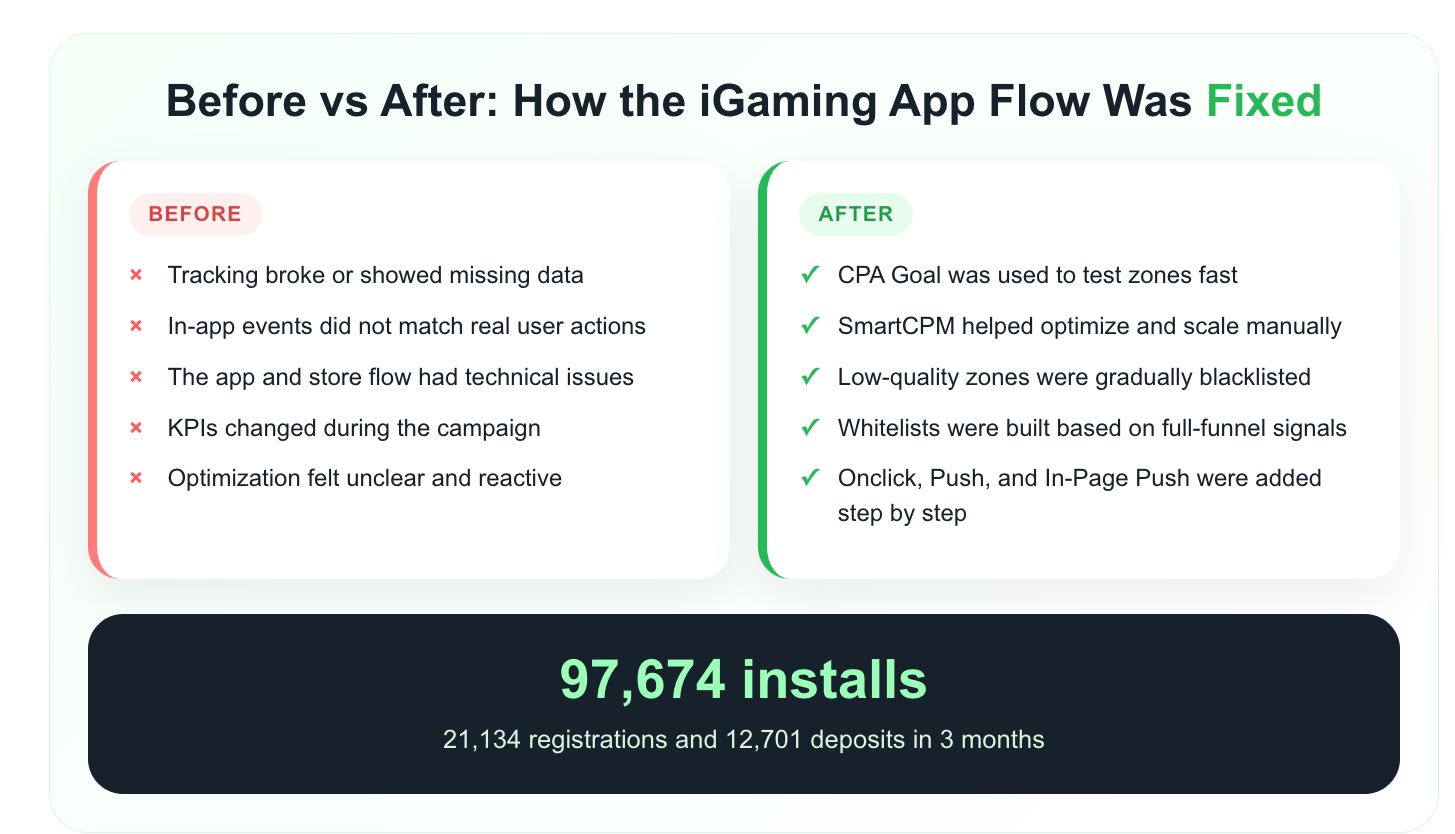
- Set clear KPIs for each step of the funnel: this keeps your optimization and scaling on track.
- Use CPA Goal to test and SmartCPM to control and scale: this combo works better than sticking to one model.
- Don’t rush into optimization: give campaigns at least 2 days to gather data first.
- Cut off weak traffic early using simple rules (like No Signal or Empty Promise) to save budget and grow faster.
- Scale step by step: start with one format (Onclick), then add Push and In-Page Push later.
Join our Telegram for more insights and share your ideas with fellow affiliates!